
Download Space Drop 2.9 for Mac | Download for Mac
| Name: | Space Drop 2.9 [TNT].iso.torrent (11M) |
|---|---|
| Version: | 2.9 |
| Operating System: | macOS |
| Program license: | Free |
| Developer: | Space Drop |
| Interface language: | English |
Overview
Dragging a file on MacOS is quite easy but it becomes difficult when the file which you want to drop is hidden behind three other windows. In such case, you are stuck holding the mouse button and trying you switch apps. You can use Space Drop for Mac that fixes these issues in quite a simple way. It gives you a easiest way to shelf at the side of the screen where you can park those files.
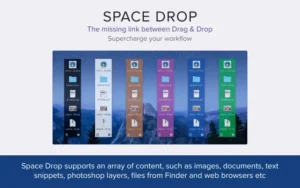
You can start dragging any file and a glass shelf slides in. You can drop the file there and let it go. Now you are free to switch apps, open any folder where you want to drag those files. When you are ready, drag those files to that folder or wherever you want to move it. It is like a tiny drag and drop app which is of small size. It is developed by FIPLAB, a quite famous developer that has been making small Mac utlities for years.
Space Drop gets updates from time to time with more compatibility and optimization features. When you drop multiple file altogether, they will turn it into a stack with a small badge on it and then it will work as a group files. This features keeps the shelf small, when you are collecting a lot of multiple files at once.
Main Features
- Choose to copy files to the destination or physically move them when dragging them from Space Drop.
- Supports multiple monitors and spaces.
- Supports almost all Cocoa file types and applications, including Photos and Outlook.
- Control which apps Space Drop detects when you drag them.
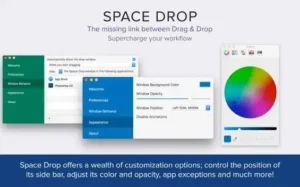
- Adjust color, transparency, window position and more.
- Works with full-screen applications.
- Supports QuickLook to preview files in Space Drop.
- Set the application to launch when you log in to your Mac.
- Toggle the Space Drop window using a hotkey if one is set.
Space Drop 2.9 for Mac Get Official
Screenshots
System Requirements
- Operating System: macOS 10.10 or later
- Processor: Apple Silicon (M1, M2, M3, M4, M5) or Intel Core 64-bit
- RAM: 4 GB minimum, 8 GB recommended
- Storage: 200 MB free disk space
✓What’s New in 2.9
- [Golden Gate] — Updated for macOS Golden Gate.
Download Space Drop 2.9 for Mac | Download for Mac Technical Setup Details
| Software Name | Space Drop MacOS |
|---|---|
| Software File Name | Space Drop v2.9.dmg |
| Version | 2.9 |
| File Size | 13 MB |
| File Extension | DMG |
| License Type | Premium |
| Developer | FIPLAB Ldt |
How to Download Download Space Drop 2.9 for Mac | Download for Mac
- Check the requirements. Make sure your MacOS version has 12 of free storage space.
- Click the Download button. Find the download button in this page and choose the version for your device (Apple Silicon, Intel, or 64-bit).
- Wait for the file to finish. Wait for the file to start downloading. Look for the [.dmg/.exe] file in your Downloads folder.
- Open the installer. Double-click it and follow the on-screen prompts. On Mac, drag the app into Applications.
- Launch and update.
- Open Space Drop 2.9 , allow any permissions, and install the latest update.
Posted in Application, Tools & Utilities.
Alternative
 Download Noir – Dark Mode for Safari 2026.2.3 for MacApplication, Tools & Utilities · Nov 12, 2026
 Download Bloom 1.5.50 for MacApplication, Tools & Utilities · Nov 23, 2026
 Download APU Dynamics Optimizer 6.0.3 for MacApplication · Nov 25, 2026
 APU Harmonic DJ 1.3.6 for Mac | Download for MacApplication · Nov 25, 2026
 Download WebScraper 4.15.9 for MacTools & Utilities · Nov 24, 2026