
Download Bear Notes 3.0.4 for Mac

| Name: | Bear 3.0.4.dmg.torrent (92M) |
|---|---|
| Version: | 3.0.4 |
| Operating System: | macOS |
| Program license: | Free |
| Developer: | Shiny Frog |
| Interface language: | English |
Overview
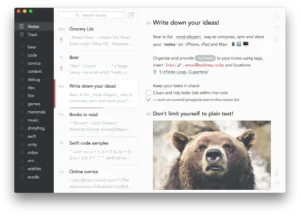
Some notes apps want you to create account, set up multiple folders before you can start writing up notes. Bear notes is the best solution for this. You simple open it, click on the new note and start writing without wasting any time. There is no need to sign up, or watch any tutorial. This is the feature which is loved by many people around the world.
Bear app is made by Shiny Frog. This app has become the top app in App Store in November 2016 and it has also won the Apple Design Award in 2017. Bear has many useful features such as there is just a simple way to format text with symbols. Type # before a line and it becomes a heading, or wrap words in ** to make them bold. You don’t have to learn it, though. There are menus and shortcuts for everything, and Bear hides the symbols so your notes look clean while you write.
Main Features
- Export Options :Export to multiple formats (Pro expands this significantly).
- Tags & Nested Tags: Organize with #tags anywhere, including in text and headings.
- Tag Autocomplete: Quickly reuse existing tags while typing.
- Document Scanning: Capture documents into your note archive (availability depends on tier/platform).
- Powerful Search: Find notes quickly using search + tag filtering.
- Markdown Editor: Fast, clean writing with Markdown syntax support.
- Note Linking: Connect ideas by linking notes together (great for knowledge bases).
- Rich Notes: Mix text, lists, tasks, tables, images, and attachments.
- iCloud Sync (Pro): Keep notes synced across Apple devices with iCloud.
- Search inside PDFs & Images (Pro): OCR-style search for attached content (where supported).
- Themes & App Icons: Customize appearance (more options in Pro).
- Bear Web (companion): Browser access designed to complement native apps, not replace them.
Bear Notes 3.0.4 for Mac Get Official
Screenshots

System Requirements
- Operating System: macOS 10.10 or later
- Processor: Apple Silicon (M1, M2, M3, M4, M5) or Intel Core 64-bit
- RAM: 4 GB minimum, 8 GB recommended
- Storage: 200 MB free disk space
✓What’s New in 3.0.4
- [App icons] — Ships refreshed Bear icon artwork so Dock tiles and launcher rows can pick up the anniversary styling described in the Mac App Store notes for this build.
- [Kumagotchi widget] — Introduces the Kumagotchi Home Screen widget that shows a pixel polar bear whose animation responds to recent writing, reading, idle, or away states inside Bear.
Download Bear Notes 3.0.4 for Mac Technical Setup Details
| Software Name | Bear MacOS |
|---|---|
| Software File Name | Bear v3.0.2.dmg |
| Version | 3.0.2 |
| File Size | 55 MB |
| File Extension | DMG |
| License Type | Premium |
| Developer | Shiny Frog Ltd |
How to Download Download Bear Notes 3.0.4 for Mac
- Check the requirements. Make sure your MacOS version has 12 of free storage space.
- Click the Download button. Find the download button in this page and choose the version for your device (Apple Silicon, Intel, or 64-bit).
- Wait for the file to finish. Wait for the file to start downloading. Look for the [.dmg/.exe] file in your Downloads folder.
- Open the installer. Double-click it and follow the on-screen prompts. On Mac, drag the app into Applications.
- Launch and update.
- Open Bear Notes 3.0.4, allow any permissions, and install the latest update.
Posted in Application, Office, Productivity.
Alternative
 Download Noir – Dark Mode for Safari 2026.2.3 for MacApplication, Tools & Utilities · Nov 12, 2026
 Download Bloom 1.5.50 for MacApplication, Tools & Utilities · Nov 23, 2026
 Download CrossOver 26.3.0 for Mac: What’s New, Full OverviewApplication · Nov 21, 2026
 Adobe Illustrator 2027 (31.0) for MacAdobe, Application, Graphics & Design · Nov 19, 2026
 Download Camtasia 2027.0.0 for Mac: What’s New, PriceApplication · Nov 21, 2026